
How to Create a Free QR Menu: Step-by-Step Guide (2026)
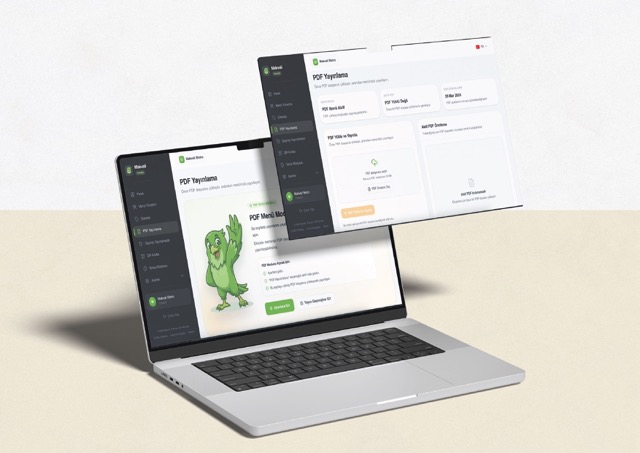
If you want to launch a QR menu quickly, start with a dashboard that lets you add products, publish instantly, and download a QR code without technical setup. This guide covers the full setup process, what to prepare, and common mistakes to avoid.
To create a free QR menu, sign up on a QR menu platform, enter your restaurant details, add categories and products, publish the menu, and download the QR code to place on tables. The process requires no technical knowledge and takes just a few minutes.
What is a QR menu and how does it work?
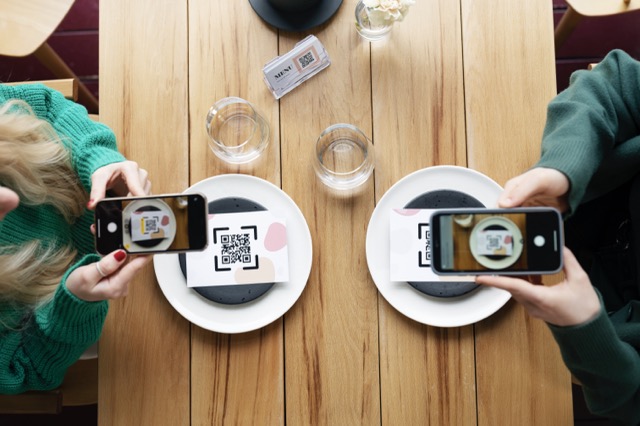
A QR menu is a digital menu system that presents a restaurant's food and beverage offerings online, accessed by guests scanning a QR code on the table with their phone. Unlike printed menus, price changes or new product additions happen instantly with no reprinting cost.
The principle is simple: the business creates its menu on a QR menu platform, the platform generates a unique URL for that menu, and this URL is encoded into a QR code. When customers scan the code, they view the menu directly in their browser without downloading any app.
How to create a free QR menu: step by step
Follow these steps to create a free QR menu. The process requires no technical skills and typically takes 15-20 minutes.
1. Sign up on a QR menu platform
Register on a QR menu platform and enter your restaurant details: business name, currency, and the language your guests expect. On platforms like Makvali, this step takes just a few minutes and basic QR menu features are free.
2. Create your menu categories
Define categories such as starters, mains, drinks, and desserts, then arrange them in the order you want guests to browse. A clean category structure makes the menu easier to navigate and can increase average order value.
3. Add products with full details
Under each category, add your products. Beyond the product name and price, include a short description, an image, and allergen information where applicable. Platforms with variant support let you define sizes, portions, or add-on options as well.
4. Publish your menu
Once all products are entered, push the menu live. Platforms offering controlled publishing let you preview before going live and roll back to a previous version if something goes wrong.
5. Download the QR code and place it on tables
Download the QR code generated by the platform. Before placing it on tables, counters, or room surfaces, always test the scan on a real phone. Make sure the QR code size is appropriate for the expected scanning distance.
What information do you need for a QR menu?
Preparing the following information before you start will speed up the setup process considerably:
- Business details: Restaurant or cafe name, logo, contact information
- Menu structure: Categories and the products in each category
- Product details: Name, description, price, and images if available
- Allergen information: Gluten, dairy, nuts, and other allergen content (regulatory scope is expanding)
- Language preference: Which languages the menu should be available in, especially in tourist areas
The businesses that launch fastest are the ones that gather this information before logging into the platform.
Start with the format you already have
If your team already has a PDF menu, do not delay the launch waiting for a perfect rebuild. Publish the PDF version first, then transition to a structured menu with categories, items, allergens, and multiple languages. This approach significantly reduces time-to-go-live.
Free vs paid QR menus: key differences
Most QR menu platforms offer basic features for free, with premium plans unlocking advanced capabilities. Here are the core differences:
- Free plan: Menu creation, product entry, publishing, QR code download, basic theme options
- Paid plan: Multilingual menu support, advanced theme customization, allergen and nutritional data management, POS integration, detailed analytics
For a small cafe, the free plan may be sufficient. For a multilingual restaurant in a tourist area or a business preparing for allergen disclosure requirements, paid features become important.
Why you need a management dashboard, not just a QR generator
Many tools can generate a QR image. Fewer tools help you manage the real restaurant workflow behind it. The difference is what happens after launch:
- Menu updates: Prices and descriptions should change without reprinting.
- Publishing control: Teams need to decide when changes go live.
- Rollback safety: If something is wrong, the previous version should be recoverable.
- Language support: Restaurants in tourism areas need more than one language.
5 most common mistakes when creating a QR menu
- Sticking permanently with a single large PDF: A PDF works for day one, but every price change becomes slow to update and risks displaying outdated information.
- Ignoring category structure and order: A clean menu structure improves both readability and average order value. Move your highest-selling categories to the top.
- Not testing on a real device: Before placing the QR code on tables, scan it on at least two different phones to verify the menu opens correctly.
- Skipping photos and allergen info: Products with images speed up customer decisions; allergen information is becoming increasingly critical for legal compliance.
- Not maintaining the menu after launch: A QR menu is not a set-and-forget asset. Price changes, seasonal products, and stock availability should be updated regularly.
Which businesses can use a QR menu?
QR menu systems are not limited to restaurants. The following business types benefit directly from QR menus:
- Restaurants and cafes: The most common use case. Tableside menu access with instant updates.
- Hotels: Room service menus, lobby cafe menus, and pool bar menus can all be managed from one QR system.
- Bars and pubs: Ideal for cocktail lists, happy hour menus, and seasonal drink offerings.
- Food festivals and events: Fast setup for temporary menus without printing costs.
- Food trucks: A practical solution where physical menu boards are hard to display due to limited space.
When Makvali fits this use case well
Makvali is a strong fit when your priority is to launch a restaurant, cafe, hotel, or pub menu quickly and still keep publishing control, multilingual menu delivery, QR code generation, and a restaurant dashboard in one place. It also works when teams want to start with a PDF and later move into a richer item-based menu.
Related guides
After creating your QR menu, continue with these topics:
- QR Menu vs PDF Menu Comparison — Which format suits your business better?
- Legally Compliant QR Menu — Meeting regulatory requirements with a digital menu
- Detailed Menu Requirement Guide — Preparing for the new menu transparency era
- Perfect Digital Menu Creation Guide — Menu design and content strategy
- How Menu Images Should Look — Tips for improving image quality
Implementation Flow
Create your restaurant workspace
Sign up for an account, enter your restaurant basics, and choose your default language and currency.
Define menu categories
Create categories like mains, drinks, and desserts, and arrange them in the order you want guests to see. A clean category structure makes navigation easier.
Add products with details
For each category, add product name, description, price, and optionally images, allergens, and variants.
Publish your live menu
Use the publishing flow to push the current menu version live. With rollback history, you can revert a faulty update instantly.
Download and place your QR code
Generate your QR code with your restaurant identity and place it on tables, rooms, or counters. Always test on a real phone before printing.
Frequently Asked Questions on This Topic
Is a QR menu really free?+
Many platforms offer basic QR menu features for free. On Makvali, creating a digital menu, publishing it, and downloading the QR code are included in the free plan.
Do I need a special device or app to set up a QR menu?+
No. Guests scan the QR code with any smartphone camera to view the menu. On the business side, a standard web browser is enough.
How does a customer use the QR menu?+
The customer scans the QR code on the table with their phone and sees the restaurant menu in their browser. No app download is required.
Can I start with a PDF menu first?+
Yes. If your business already has a printable menu, you can publish a PDF first and then evolve into a richer item-based digital menu later.
Is QR menu setup suitable for hotels and pubs too?+
Yes. The same flow works for restaurants, cafes, hotel food-and-beverage operations, bars, and pubs that need a fast public menu surface.
Why is publishing control important?+
Because changing menu data is not enough by itself. Teams also need a controlled publish and rollback flow so the live menu stays consistent.
Is a QR menu safe for customers?+
Yes. The QR code simply redirects to the menu page. No personal information is collected from customers, and the menu is publicly accessible.